Showing posts with label Tricks. Show all posts

Tricks And Tips To Increase Adsense Revenue

By: AAMIR On: 1:55 am
  • Share The Gag


  • Yesterday, we talked about somethings you should consider before starting off your blog in 2013, and in that, we discusses about some SEO-related things. For a lot of blogs out there, the major purpose is to make money, So today, we'll carry on the idea, and talk about Google AdSense. For beginners as well as advanced users, the start of a new year would be a good time to start thinking about your AdSense campaign. Are you making the most out of your ads? Now would be a good time to review your ad performance, and make changes accordingly. So here, we'll provide you with a checklist of 6 things you can do to optimize AdSense and make the most out of your ads.


    Recommended for you: Top tips to optimize Google AdSense Ads on your blog

    1. Are you utilizing your ad spots?

    This is the first questions you should be asking yourself. AdSense won't allow you to add as many ad units as you like. But are you even utilizing all the ad-spots that it does allow? For every page on your website, AdSense will only let you place three AdSense for content units. These vary in size, so you can utilize the best possible locations your ads can fit in. But you can only place one 300x600 ad unit. Apart from this, you can use three text-ad units, and two AdSense for for search boxes units. Before placing all these ad-units though, take some time to consider whether you have a sizable quality content to ad unit ratio. It just doesn't make sense if all the ad spots have been used, but there is no actual content on that page.

    2. Take a look at your ad sizes

    Generally speaking, wide ad units tend to perform better than tall ones. For example, the 728x90, 336x280, and 300x250 ad sizes are usually the highest performers. You should try on multiple ad sizes, and find out for yourself what works best for you. The ad size should also correspond to the placement of your content. For example, a tall and thin ad-unit doesn't make sense within a written post.

    3. Use text and images too

    Usually, publishers just focus on image ads, and forget about the other options available. Adding text ads is a good idea as well, because they compete with the image ad units for the same space. Using a combination of text and image ads can help you earn a lot more.

    4. Add search boxes

    As mentioned above, image ads are not the only thing in the world. AdSense will allow you two AdSense for search boxes units per page as well. They let you place a custom search engine on your site to provide users with web search. And you might earn from relevant ads on the search results page.

    5. Make your ad units accessible

    Pay special attention to where you actually place your ad units. They should complement, and fit in with your content. And also, users should be able to easily identify and access them. Generally, ads should be above-the-fold. Google offers a lot of guidelines to help you place your ads.

    6. Check out color combinations

    Last, but not the least, use trial and error, and play around with various color schemes and ad styles. They can play a big part in how much revenue you earn. There are three strategies you can choose from. Blend, Compliment, and contrast. Compliment is normal placement, where ad units are used within content, and are distinguishable. Blending ad units into content means using the same colors, so that it is hard to distinguish the ad unit. Contrast means you use contrasting colors that scream out an ad-unit's presence. You can use any of those, as long as you follow the guidelines from Google.

    That was it for now. Stay tuned for more on AdSense. For any questions, please use the comments section below. Peace :)

    Tips and Tricks to Increase Your Website Or Blog Traffic

    By: AAMIR On: 1:48 am
  • Share The Gag

  • Tips To Increase Blog Traffic Inorganically
    The success of a Blog totally depends on the traffic following it. It’s important to identify the significance of building a considerable traffic and then maintaining it because it is your blog’s traffic that decides the future of your blogging career. I have been observing newbie Bloggers Trend closely since the day I started my blogging career. The reason why most of the bloggers find their blogs going nowhere is that they serve 40% of their time in searching from where to get the contents, 20% on manipulating it,20% graphics and layout, etc. and only 20% on bringing traffic and increasing viewership. However you need to know that no matter how masterpiece articles you produce, if there is no traffic to read it, you have simply wasted your time in writing it!


    Therefore, in order to enhance your earnings with your blog, you need to follow the examples that professional bloggers have left for you. We experimented whatever we learnt throughout as a blogger on our sister blog, smartearningmethods.com, and the result is in front of you.
    Here are 50 best Tips to Drive huge traffic to your blog.

    1. Outline your Objectives


    Just like any other business to start, you must figure out what your actual target is. You need to understand yourself whom to target to. Once you know who can be your potential readers and from where to get them from, you can then apply the remaining tips to increase your blog traffic-and your earning!

    2. Offer Quality posts

    No other good example can make the point clearer here, to keep your living room attractive; you need attractive furniture too, isn’t it? Now, the quality of your content reflects your entire blog, further attracting readers to stay connected.

    3. Comment on blogs and come in limelight

    comment on different blogs
    You must accept the fact that when you are planning to make money online, then you must interact with readers on different blogs having same niche. As having expertise in your niche, you can always leave your suggestions on other blogs, this highly attracts readers of that blog to learn more about you.

    4. Optimize your Blog for search engines

    Although majority of the newbie Bloggers find this one as the toughest part of the story, it’s the most important one, to be accurate enough. Try learning more about how to make your posts SEO friendly.

    5. Use Forums

    Have your heard of “out of sight – out of mind policy”?, if not then better start considering it. as a blogger, you need to achieve some popularity- enough to drag people to your blog to know more from you. Join forums and take part actively. Don not forget to add your blog signatures (link) in the end of your comments

    6. Say Yes to Guest posting

    guest posting
    Guest posting is an effective way to get back links for your blog. while you offer guest posts on blogs, having huge traffic, you are actually introducing your existence, asking them to come and visit your blog-thus follow you!

    7. Using trackbacks:

    You can always take the help of trackbacks that are widely available on internet, one of them being copyblogger. Its do wonders in increasing your blog traffic

    8. play with List Series

    About 70% of the total net users are not bloggers. You need to keep self inviting posts to attract readers and the best results are achieved with list series, where you provide quality information in terms of lists like, Top series, Best series, etc. Readers hardly find long, dry piece of information without having any sense of attraction in the content

    9. “top 10” posts

    Show versatility and produce top 10 Series, readers look for them

    10. “Top 50” posts

    Too much material to make it as a top 50? Go ahead; it would bring more readers, generating more traffic.

    11. Best 100

    Large Numbers increase your credibility. If you are sure to share a lot of interesting information, it’s better to split the post in two or three parts, like 100 ways to earn money-part1 and similarly for other parts.

    12. Share your secrets- earn more secrets

    Talk about the strategy that works best for you. People are in search of working formulas and there are possibilities they get what they are looking for on your blog.

    13. Write Link bait posts

    “Link bait” basically is the type of work others will want to link to.

    14. Create a mailing list

    Use email marketing for promotion of your blog traffic.

    15. Try to Get a hold of Media

    Publicity of your blog via media can generate huge traffic for your blog.

    16. Technorati

    Submit your blog to technorati,

    17. Write tutorials – become authentic

    Writing tutorials for a tutorial site is again a great idea. You can tutor people in your domain and can increase your own blog traffic by leaving a link there.

    18. secret bloggers club

    Help other so that they help you. Bloggers here re-tweet their posts and share traffic.

    19. Ping Your Blog

    ping your blog after writing your posts, e.g. pingomatic.

    20. Take help of blogging communities

    There are communities that are administered by professional bloggers like MMO Social Network and BlogEngage.

    21. BlogCarnival.com

    Blog carnivals is a good platform to get traffic from. A Must join site.

    22. Create videos

    Create videos related to your niche and promote your blog with them.

    23. Your site- Your Identity

    Just as Mr.Mustafa did, professional bloggers recommend to Include your blog URL as signature in your email.
    YOUR SITE IS YOUR IDENTITY

    24. Use Social Media

    Use social media to promote your blog like advertising your blog with Facebook Ads. It does wonders.

    25. Offer Contests

    Starting contests on your blog bring more real targeted subscribers.

    26. Advertise with Google Adwords

    Advertise your blog using Google Adwords.

    27. feed directories

    Submit your blogs to these feed directories

    28. Free Press release

    Free press release websites are in search of press releases. Write it for your blog and submit to them

    29. Use Newspaper

    Ready for some investment? Advertise your blog on your local newspaper

    30. Stay updated

    Visit big blogs like techcrunch and mashable to keep a check on the latest happenings so that you can share them quickly with your readers too.

    31. Do Video Posting

    Entertain your readers by sharing video posts as reading big articles sometimes become too boring.

    32. Interview ProBloggers

    Give importance to professional bloggers by interviewing them. this will bring their followers on your blog too

    33. Use Pictures

    Images you use are equally important as the words of your post. choose them wisely.

    34. Use Google News

    Get your blog listed in Google news.

    35. Target Celebrities

    Your readers have an other side of the personality too. They always take ken interest in the news your share about celebrities. do focus on that as well.

    36. Television

    Publicizing your blog on local television is the best way to attract maximum customers. This method is very fruitful if one has the best resources.

    37. Radio

    With the rejuvenation of the radio channels, marketers now tend to advertise their blog on these channels by making live calls, sending text messages regarding your blog or through different deals with the radio organization.

    38. Twitter

    Twitter welcomes all kinds of bloggers to market their blog as tweets using #hashtags.

    39. Online yellow pages.

    The Online yellow pages can be also used to make your blogs available to your readers.

    40. Like, tweet, Google+, etc.

    One best way to attract traffic for your blog is by adding the social sharing buttons of like and share. Through this, hundreds of people will come to read your blog when you share your posts.

    41.Blog Directories

    Blog Directories assist in directing huge amount of traffic to newly turned bloggers and hence it adds to the publicizing of your blog.

    42. Website directories

    By sharing your articles to website directories you can get traffic.

    43. Use Article Directories

    People also get to know about your blog when you submit your posts to Article Directories.

    44. Write on controversial topics

    Diplomatic statements and controversial topics always help in achieving traffic for your writings. Writing on famous controversies like Steve Jobs, Facebook Timeline, etc can be very effective for your blog’s marketing.

    45. Attack Google or any big company:

    Once you hit your target of getting enough traffic to be talked about after one big hit article, all you got to do is keep moving with that flow as big platforms like Google is bound to cover for your blog already!
    If you want to upgrade your blog rankings, then getting yourself enlisted in DMOZ, a google-affiliated directory that improve your blog rankings in various search engines and you can earn huge traffic.

    46. Tags – the most important:

    Having a tag is extremely crucial for attracting traffic. When you develop tags that are in hand with the tags used by the best search engines, you are bound to get traffic for your blog.

    47. yahoo answers:

    Being a proactive and a reactive blogger is very important. If you prove to your readers that you are a reliable blogger, your traffic will cease to go elsewhere and you will enjoy blog-loyal traffic permanently.

    48. Use StumbleUpon

    Remember to posts your articles to StumbleUpon.

    49. Blogger Feedback on Questions

    Compile the various queries that are frequently asked from different bloggers and write them up in one post. That particular post would serve as an added bonus for your readers.

    50. Consistency

    Earning with a blog on regular basis requires you to work hard consistently too. Its not a matter of a day or a week, in fact, you need to work harder and harder each day to build a strong readership, so much so that your readers start relying on you as an authentic source.
    That was all for now, really hope that these tips would do magic for you as they did for Us.
    Blessings,

    Easy Ways To Earn Money Online

    By: AAMIR On: 1:45 am
  • Share The Gag


  • Make Money Online Tips

    In a world such as today’s, where inflation is on the rise while salaries remain the same, every extra penny can be a blessing. Self-dependence is considered as the ideal situation to be in, especially among the younger generation. Because of the ever rising cost of living commodities and luxuries, more and more people are finding themselves working over-time for some extra salary, looking for better jobs, working part-time to cover their expenses, and so on. Hence, people want to look for alternate or parallel sources of income. And as they say, "where there’s a will, there’s a way". Indeed, there is not one, but many ways you can earn a few extra bucks. Many of these involve working online, meaning you can increase your income while working in the comfort of your living room!
    Most of my blogger friends would know how they can earn money online through their blogs via monetizing them. But not everyone has a blog, even though creating a blog is as easy as creating a Facebook profile. Maintaining a blog, however, is not as easy. Hence, for such people, there are various other ways through which they could earn an income.  

    Freelancing

    I hope you most of you know what freelancing is. It is basically working for someone else online and getting paid for it. By far, this has proven to be the most popular and most paying alternative to a regular office job. And in many ways, freelancing is better than regular jobs. Firstly, you get to do the work that you choose, so that you have some interest in it. Secondly, there's a wide range of stuff you can do. You can write articles, translate papers, do programming assignments for somebody, or take up large corporate projects as a team. The upside to this is that, you earn good bucks. The downside is, yo have to abide by deadlines.

    Freelancing

    Freelancing is great. It's your own way of saying out to the world; hey! I am independent! I don't need a job! I have a life too! Although technically, you do have a job. But at this job, you can take a nap at anytime and do whatever you want, so long as you do your work.

    If you want to look into this, you can try 5 Ways To Win A Job As A Freelancer For Beginner. Or take a look at the Top 10 Freelancing Tips.

    Online Surveys

    Online surveysThere are many websites out there that are looking for people who would help them in their research and fill out surveys for them. Their aim is to get feedback and do market research on a product. There are website that are dedicated to finding out surveys available for you. One good example is SurveyScout.

    Write Articles

    Freelance writing is another great way of earning online. If you like writing, or if you are good at it, then you should consider this. Writing quality articles can earn you thousands of dollars per month. All you need to have is the right focus and of course, a good publishing platform where you can submit your articles.


    As far as publishing is concerned, you can either self-publish, or submit your article to an article directory. You can either create a blog for self-publishing, or use Squidoo or Hubpages. Click to learn more about earning money through Squidoo.

    If you don't want to self-publish, you can submit your articles to the top sites that will pay you for them. This is one of the best ways of earning online. Be sure never to plagiarize, however. Unique content is appreciated, while plagiarism might result in a ban on you. So be original, and you will be fine.

    Data Entry

    Data Entry is another popular money earning technique used by many people. But I must admit, it is a boring and time-intensive work. There are a lot of companies that want you to do their laborious tasks for them, without hiring a professional for the job. Usually, these tasks are simple. Entering one form of data into a form, organizing data, removing mistakes and errors, and so on.

    Surfing and searching

    Did you know that you can get paid to search on the internet? No kidding! Since the major search engines such as Google, Yahoo, Bing etc are monopolizing the industry, other smaller engines are left out. So to keep themselves going, they invite net searchers to use their engines, and offer rewards in return. One such company is Swagbucks, that gives you the chance to earn up to $5 per search! It's a neat little trick and I know some people who have started doing this to earn money. Another is InteradMedia, that pays $0.001 per minute of active search. The money isn't very substantial, but what's the harm in getting a few extra bucks every now and then?


    There's another alternative way! Some website pay you to surf them! SurfBounty is a good one. All you need to do is stay on that site for a few seconds to register a "surf". Sit back as the dollars add up! Sounds great huh?

    Earn Through Skype

    About a month ago, I wrote a post in length about earning money through Skype. You can follow it here: Earn Money through skype. But the bottom-line is, with Skype, you can provide services such as tuition to other people, and charge them for the call through Skype Prime.

    Q&A Websites

    Some Q&A websites will pay you to answer questions! Q&A websites are all about question that people ask. People ask all sorts of questions on such websites. So the websites hire people to answer those questions. So if you have a good general knowledge, why not give it a shot?

    Play games to earn money!

    Every app developer needs beta testers, who have nothing to do with the development of the apps. This helps them remove bugs and errors. With games, this is even harder.It requires a lot of man hours to test a game. So there are many companies that pay people to play their games, and provide feedback. That way, they can know if the project would be a fail or a success.

    Ebay

    Ebay is an advertising website where people put up classifieds for for things they want to sell, and then buyers contact the seller to purchase that item. If you are good at bargaining, you can take a shot at this. Buy products at a reasonable price, and then sell them again for a profit! This is how real estate works, except in that case, they are dealing with lands and houses and large property.

    This was an essence of some of the things that I have learned. But by no means are they all the ways there are. You can find more ways at our sister blog Smart Earning Methods. Thanks for reading :)

    How To creat Meta Tag Generator Tool For Blogger

    By: AAMIR On: 1:27 am
  • Share The Gag
  • Meta description and meta keywords are the most popular html tags which are still recommended despite many arguments by several expert Search engine Optimizer  The first thing that every blogger must do after creating a log is to optimize his template by submitting it to search engines and by adding important meta tags inside the template. To make your job easy I have created a simple Meta Tag Generator Tool below which will help you create important tags within seconds with no SEO knowledge required at all!  Follow these tips for writing best blog description and for choosing the most relevant keywords for your blog.

    Meta Description:
    Describe your blog in max 150 letters. The Character Counter tool can help you. For example I have chosen the following words for describing my blog,

    A Blog about Blogger Tricks, Blogger Templates, Widgets, SEO, Make Money Online, CSS and HTML Tricks etc.
    You can choose a similar format to describe your blog with most relevant words.
    Note:- I have enclosed the meta description inside a dynamic HTML tag in order to avoid duplicate content issue. Confused? Let me explain. If Meta description appears for all pages in your blog then search engine robots would think that all your pages are having same description. Since robots deal each page as a separate website therefore your blog could get penalized for using same meta description over and over again. To avoid this I have added two pieces of code before and after meta description  so that it may appear to robots at homepage only. Following are the two codes added to the tool by default,


    Meta Keywords:
    Choose words that describe the core topics of your blog. Keywords are high traffic targeted words that define your blog content. Most people use dozens of most competitive keywords but doing this is unnecessary and further effects your search engine listing.Choose few but smart keywords that may reflect the overall content of your blog.Google keyword Tool can immensely help you in choosing the right keywords. The best tip is to use similar keywords as used by your competitors. You can press Ctrl + U to open the source file of your competitor while you are on his blog. Through source file you can easily see what keywords and description your competitor is using.
    Write a maximum of three words per keyword and separate each keyword using a comma. See my keywords as an example,

    Blogger tricks,blogger tips, SEO guide, make money online, blogger widgets, css html tricks
    Meta Author:
    This is not a very important tag but still everyone likes to attach his name to his website so why should you left behind! :p Simply write your full name and avoid using nicknames or special symbols.
    If you don't want to add your name then simply leave the blank empty in the tool below.
    Meta Robot:
    Sometimes you don't want search engine robots to crawl and index your blog so you can simply tell the robots that don't crawl the data of the blog using the No follow tag or No index tag.  By default blogger tags all blogs as ALL
    If you don't want to be bothered with this tag then simply leave the blank empty in the tool below.

    Meta Tag Generator Tool


    Description:
    Keywords:
    Author (Optional):
    Robots (Optional):


    Create Free Email address Using your Website Domain With Google Apps

    By: AAMIR On: 1:16 am
  • Share The Gag
  • One of the very first things that any web owner likes to do after purchasing a domain is setting up a branded Email address ending with the domain name. Blogger users who purchase a domain often find it difficult to set the MX records in their webhosting account, thus they don't bother using a branded email address. If your website address is www.example.com then your branded email Id would look like yourname@example.com. You will be able to access it using the addressmail.example.com. The best thing about todays' tutorial is that we wont be using inefficient webmail services like round cube, squirrel mail or horde that you often find in your hostgator webmail clients. We will be using Gmail, which means you will manage all emails received at your website's email address straight in your very own custom Gmail account. You can also create up to 10 email addresses using your domain without paying a penny with Google Apps. You will stay safe, protected and most importantly served well.  Lets now create a Gmail account for your company's website or blog and connect it to your web host in easy steps.
    Google Apps Services 
    Part1: Create Free Email address For your domain with Google Apps
    Note: This post may seem too much techy but its really simple to apply and all fun! So act like tomb boys and give it a try. :)

    Steps To Create a Gmail Account For a Website

    You will get a free 10GB storage to save all your emails no matter how loaded they may be with rich media. 
    Follow these easy steps:
    1. Go To Google Apps for Domains
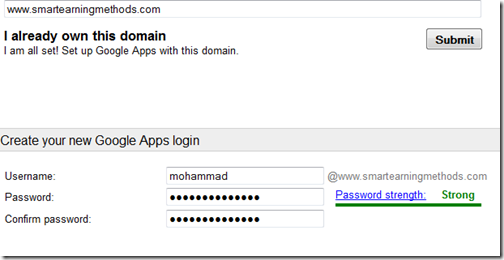
    2. Submit your website address without typing http://
    3. Then fill up the vacant blanks with required information. Keep your username simple because this will be attached to your domain name to create your custom Gmail account username. In my case I choose Mohammad for my sister blog.


       4.  Keep Alternate email address the same as your personal Gmail ID or any ID  that you use frequently.
            5. Click the submit button to create your account

            6. You have now successfully created an account with Google apps. Now you need to verify that you actually own the domain. You will be given two options Express andCustom. Choose express.

     7.   Click the next buttons till you get to Domain verification page. Here you get 5 options to verify your domain which are:
    1. Upload HTML File      (Recommended Method)
    2. HTML Tag            (under alternate Methods tab)
    3. Google Analytics       (under alternate Methods tab)
    4. Domain Name provider       (under alternate Methods tab)
    Choose the second option of HTML Tag because it is the easiest of all. Copy the simple Meta tag and paste it inside your template just below section. 
    Tip for Genesis Users: 
    Once done, hit the verify button and you are half done. 
    domain verified
    Click the continue link and you will be taken to Google Apps Setup wizard. You may keep all options default and keep clicking next till you reach setup Gmail:


    Choose other from the drop down box which says "Choose your Host" Click Next
    Setting up MX Records
    Here you will be given four MX entries that you need to submit to your webhost. 


    You will need to log into your web host account and navigate to DNS Manager or DNS settings. DNS zone is also called DNS ManagementMail Server Configuration, orName Server Management, depends on your webhost. I will be sharing here the settings for hostgator here which will give you a clear observation on what to do.
    Setting For HostGator:
    1. Log in your Control Panel
    2. Click the MX entry icon just under Mail
    3. Choose your domain
    4. Set Email routing to Automatically Detect Configuration
    5. Now enter 5 MX entries one by one inside the Records box.  These MX entries are given to you by Google apps. While entering the destination remove the dot in the end. For example ASPMX.L.GOOGLE.COM. should be entered as ASPMX.L.GOOGLE.COM


    5.  When everything has been entered correctly it will look like this:

    Note: If an MX entry exists by default, you may delete it and keep only the above 5 MX entries. It will take 24 hours for your Email to connect to Google servers so be patient
    Go back to Google apps and keep on clicking next till you complete the wizard. Though completing the setup wizard is not necessary but to avoid the irritating prompting messages better complete it. 
    Congratulations! You have now successfully created a custom Gmail address for your website. . 

    Create Custom Email Web Address

    To access your account you will need to follow a standard long web link. Ours looks like:
    https://www.google.com/a/cpanel/smartearningmethods


    Connect your Gmail Accounts

    The Gmail account you just created is different from your primary Gmail account that is used for personal use. In order to manage this new account using your primary account we will need to connect these two accounts so that all mails sent toyourname@example.com are received at yourname@gmail.com. For this you will need a Gmail account as your primary mailing service. It wont work with Hotmail or Yahoo. To learn how to do this please stay tuned for tomorrow's tutorial.